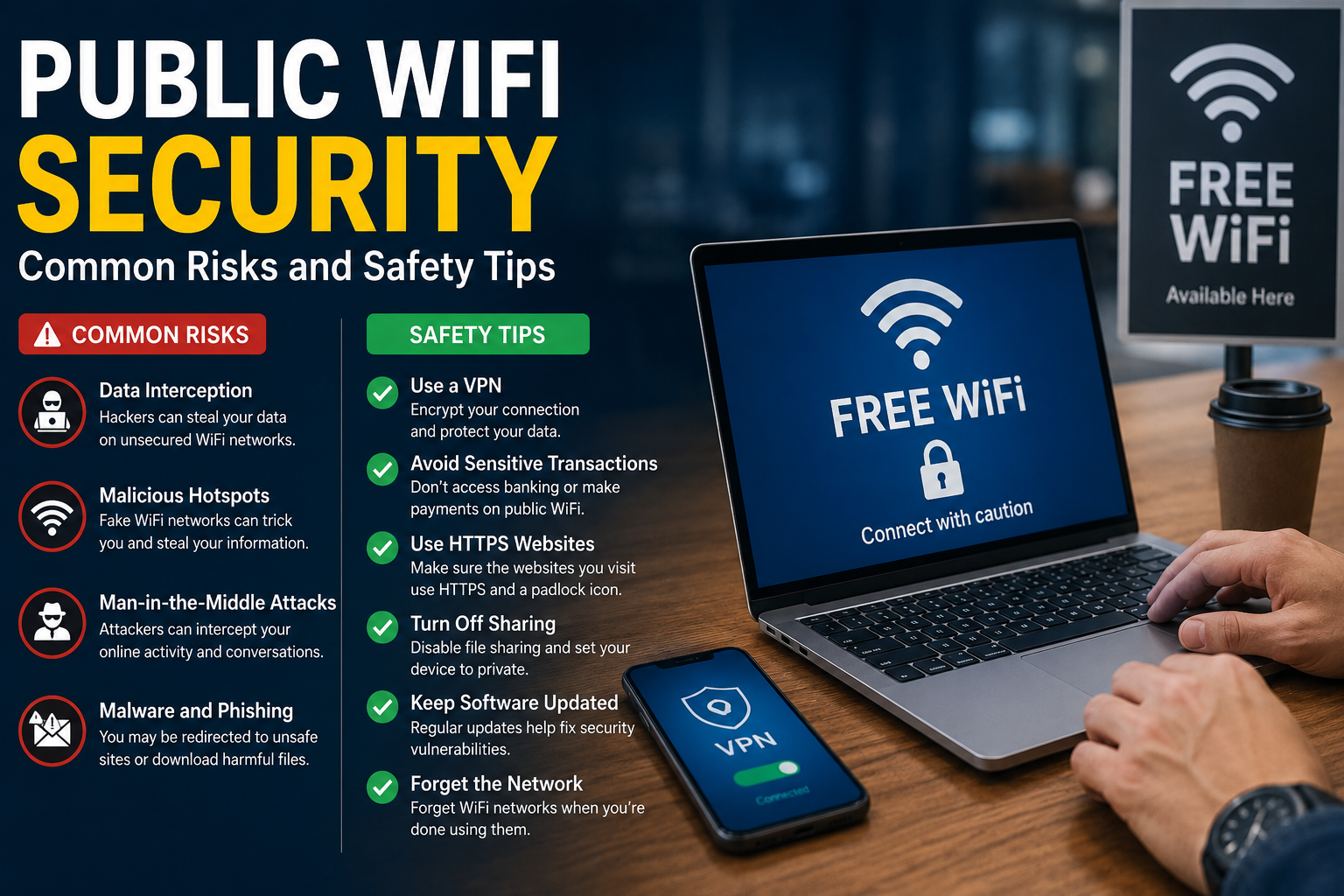
Public WiFi has become a normal part of everyday life. I often find it available in coffee shops, airports, hotels, restaurants, shopping centers, libraries, and other public places. It is convenient because I can connect my phone or laptop to the internet without using my mobile data. However, convenience does not always mean security.
When I connect to a public WiFi network, I do not always know who manages the network, who else is connected to it, or how well it is protected. This is why I believe understanding public WiFi security is important for anyone who uses the internet outside the home.
Public WiFi is not automatically dangerous, but it can create additional security risks when compared with a trusted private network. With a few simple habits, I can reduce many of these risks and use public internet connections more safely.
What Is Public WiFi?
Public WiFi is a wireless internet connection made available to people in a public location. Some networks are completely free, while others require a password, registration, purchase, or membership.
For example, a hotel may provide WiFi to guests, while a coffee shop may give customers a password after purchasing something. Airports and shopping centers may provide open networks that anyone can access.
The important thing is that I should not assume a network is safe simply because it has the name of a familiar business. Someone could potentially create a fake network with a similar name to trick people into connecting.
This is one of the reasons why public WiFi security deserves attention.
Why Is Public WiFi Less Private?
When I use my home WiFi, I usually know the router, password, and people who are authorized to use the connection. A public network is different because many unknown devices may be connected at the same time.
The network may also be configured differently from my home network. Depending on the setup, other users may have opportunities to observe network activity or attempt to communicate with nearby devices.
Modern websites and applications often use encryption, which provides important protection. However, I still avoid treating public WiFi as a completely trusted environment.
My approach is simple. I use public WiFi when I need it, but I remain careful about the information I send and the actions I perform.
Common Public WiFi Security Risks
There are several risks that people should understand before connecting to an unfamiliar network.
Fake WiFi Networks
One of the simplest tricks is creating a fake WiFi network with a name that looks legitimate.
Imagine that I am sitting in an airport and see a network named Airport Free WiFi. I might connect without thinking. However, the network could be operated by someone who is trying to attract nearby users.
A fake network may be designed to collect information, redirect users to websites, or monitor certain types of activity.
I therefore check the official WiFi name whenever possible. If I am in a hotel, restaurant, or airport, I can ask staff for the correct network name instead of guessing.
Data Interception
Another concern is data interception.
If information is sent over an improperly secured connection, an attacker may have an opportunity to observe or capture certain network traffic.
Encryption provided by websites, applications, and other security technologies can reduce this risk considerably. Still, I avoid sending sensitive information over unfamiliar networks whenever it is not necessary.
This is especially important when handling financial information, confidential work documents, or sensitive personal details.
Man in the Middle Attacks
A man in the middle attack occurs when an attacker positions themselves between two communicating systems and attempts to intercept or manipulate communication.
Public networks can provide an attractive environment for this type of attack because many users may be connected at the same time.
I reduce my exposure by keeping my devices updated, using secure websites, avoiding suspicious connections, and using a trusted VPN when appropriate.
Malware
Public networks can also increase exposure to malicious activity.
If my device has outdated software, weak security settings, or unnecessary sharing features enabled, attackers may have more opportunities to target it.
I keep Windows, Android, iOS, browsers, and applications updated because security updates often fix known vulnerabilities.
I also avoid downloading unknown files simply because a public WiFi login page or pop up tells me to do so.
Phishing Attacks
Some public WiFi environments can be used to distribute phishing pages.
For example, after connecting to a network, I might be redirected to a page asking me to enter an email password, payment information, or other personal details.
I do not automatically trust a login page just because it appeared after connecting to WiFi.
If a page asks for unusually sensitive information, I stop and investigate. I also check the website address carefully before entering credentials.
Use a VPN on Public WiFi
One of the most useful public WiFi security tools is a trusted VPN.
A VPN creates an encrypted connection between my device and the VPN service. This can provide an additional layer of protection when I am using an untrusted network.
However, I do not believe that a VPN makes me completely invisible or safe from every online threat. It does not protect me from phishing, malicious downloads, weak passwords, or scams.
I choose a reputable VPN provider and avoid questionable free VPN applications that may collect unnecessary data.
For sensitive work on public WiFi, using a trusted VPN can be a valuable part of my security routine.
Avoid Banking on Public WiFi
I prefer not to perform sensitive financial activities while connected to public WiFi.
If I need to check my bank account, transfer money, or make an important payment, I prefer using mobile data or another trusted connection.
Sometimes this is not practical, but whenever I have a choice, I take the safer option.
The same principle applies to other highly sensitive activities. If an action could cause serious problems if my information were exposed, I consider waiting until I have a trusted connection.
Check for HTTPS
When I visit websites, I check that the connection uses HTTPS.
HTTPS helps encrypt communication between my browser and the website. Most major websites use it by default, but I still pay attention to browser security warnings.
The padlock or secure connection indicator in a browser can provide useful information about the connection. However, I remember that HTTPS alone does not prove that a website is legitimate.
A phishing website can also use HTTPS. That is why I check both the security indicator and the actual website address.
Turn Off File Sharing
When I am connected to public WiFi, I do not want my computer to make unnecessary files or services available to other devices.
On a Windows computer, I review network discovery and sharing settings and use a public network profile when appropriate.
I also avoid sharing folders that contain personal documents, photos, or other private information.
This is a simple step, but it can reduce unnecessary exposure to other devices connected to the same network.
Keep Your Device Updated
Software updates are an important part of public WiFi security.
I keep my operating system, browser, applications, and security software updated. Updates can fix vulnerabilities that attackers may otherwise exploit.
Before traveling or spending a lot of time away from home, I like to check for available updates. Doing this in advance is useful because some updates can require a restart or a large download.
A properly updated device is generally in a better position to defend against known security problems.
Turn Off Automatic WiFi Connection
I recommend disabling automatic connection to unknown WiFi networks.
If my phone or laptop automatically connects to any available network, I may unknowingly join a network that I did not intend to use.
Instead, I prefer choosing networks manually.
This also gives me an opportunity to verify the network name before connecting. When I leave a public location, I can disconnect from the network and remove it from my device if I do not expect to use it again.
Forget Public Networks After Use
If I connect to a public WiFi network once and do not plan to return, I can forget the network.
This reduces the possibility of my device automatically reconnecting to that network in the future.
I consider this a small but useful habit, especially when traveling between different cities or countries.
My device does not need to remember every public network I have ever used.
Use Mobile Data for Sensitive Activities
Sometimes the safest option is simply using mobile data.
Modern phones make it easy to switch between WiFi and cellular data. If I need to access something particularly sensitive and I am uncertain about a public network, I can disconnect from WiFi and use my mobile connection instead.
This can be especially useful for banking, password management, account recovery, and other activities involving valuable information.
Mobile data is not completely risk free, but it can be preferable to an unknown public network.
Do Not Ignore Security Warnings
If my browser displays a certificate warning, suspicious redirect, or other security message, I do not ignore it just to access a website.
Security warnings exist for a reason.
Sometimes a public WiFi login system may behave strangely, but that does not mean I should automatically bypass every warning. If something looks unusual, I disconnect and verify the situation.
Taking an extra minute can be much better than dealing with the consequences of compromised information.
What Should You Do If You Used Unsafe Public WiFi?
If I realize that I used a suspicious public WiFi network, I do not immediately panic.
First, I disconnect from the network. Then I check my device for unusual behavior and make sure my operating system and applications are updated.
If I entered a password on a suspicious website, I change that password from a trusted connection. If the same password was used elsewhere, I change it there too.
I also review important account activity and enable two step verification where available.
If financial information may have been exposed, I contact the relevant financial institution through an official channel.
Final Thoughts
Public WiFi is useful, convenient, and sometimes necessary, but I never treat an unfamiliar network as completely trusted. Understanding public WiFi security helps me make better decisions when using the internet in airports, hotels, cafes, restaurants, and other public places.
The most important habits are simple. I verify the network name, avoid sensitive activities when possible, use a trusted VPN, keep my devices updated, disable unnecessary sharing, avoid suspicious links, and turn off automatic connections to unknown networks.
I also remember that no single security tool provides complete protection. A VPN can help protect the connection, but safe browsing habits are still important.
From my point of view, the best public WiFi strategy is not to be afraid of free internet. It is to use it intelligently. A few careful decisions can significantly reduce the chances of exposing personal information while still allowing me to enjoy the convenience of staying connected wherever I go.